
 Mi-Light & MiBoxer
 Sunricher
 LTech Controls


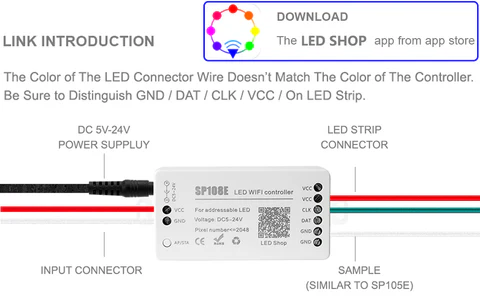
SP108E WiFi Controller DC 5V-24V for SK6812 SK6812-RGBW WS2812 WS2813 WS2811 AL2815 Digital Pixel Strip Light & Neon Flex
WiFi Remote Control: Long-distance IOS and Android App remote control via WiFi, IOS 10.0 or Android 4.4 or later edition required. Support routing connection mode (AP) and LAN connection mode (STA)
Rich Color Modes:180 kinds of multi-color dynamic modes, 8 kinds of single color modes such as a meteor, breathing, wave, catch-up, stack, flash, flow, static. Color, brightness, and speed are adjustable
Capture the image’s color you like: The WiFi controller features a creative from-image-to-effect function. It can capture the color of the image, create distinctive color effects and synchronize light color with the atmosphere of your room
User-friendly design: Support setting pixels number and segments number, control up to 2048 pixels in total. Save user setting when power off. DC 5V~24V wide working voltage; reverse connection protection; hot-swap protection
Wide Compatibility:Support almost LED IC, such as WS2811,WS2812B, WS2801, SK6812, SK6812-RGBW, WS2813,SK9822,APA102,WS2818, LPD6803, LPD8806, TM1913, UCS1903, SM16703, DMX512,etc. (DO NOT control 5050RGB or RGBW led strip which has no IC )
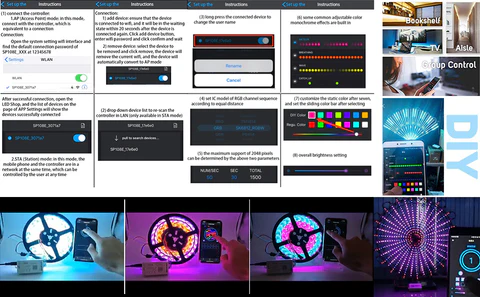
WHY NOT WORKING? It's very important to know the difference of the 2 modes AP Mode & STA Mode.
AP(Access Point) mode: controller and phone connect directly ,controller working as an access point.
Connect steps:1. When the device is not connected to any WIFI network, power on the controller and wait for 20s
and the controller will switch into AP mode;
2.In the WIFI setting page, find and connect the controller(named like SP108E_xxx,the default pin code is12345678);
3. Open the LED Shop App, then the controller will be shown on the device list.
STA(Station)mode: Controller and phone are in one same WIFI network,in this network. users can operate the controller smoothly
Connect steps:
1. When the device is not connected to any WIFI network, power on the controller, the controller will remain in Wait-For-Connect mode for 20 seconds;
2. Make sure that your phone is connected to the WIFI network, Open LED Shop APP, press the Add Device button, input the WIFI pin code, then press the OK to confirm and wait for the configure processing finish;
3. When the controller successfully enter the WIFI network, it will be shown on the device list;
4. User can select the controller and remove it from the network by pressing the Remove Device button, then the controller will switch into AP mode.
Specification:
Control Type: RGB RF Controller
Voltage: 5V-24V DC
Dimension: 10.5 x 5.4 x 2.4 cm; 61 Grams
Energy Class: A++
Detection Distance: 20 m
IP Rating: IP40
Includes: Screw Driver
Colour Mode: 300
Warranty: 2 Years
Working Temperature: -30°C ~ +60°C
Related Items

MiBoxer RGB+CCT LED Controller - Hubless - 6 Amps/Channel - 12-24 VDC - Optional Remote

Mini RGB Controller with RF Remote - Dynamic Color-Changing Modes - 4 Amps/Channel - Mini RGB LED Controller

MiBoxer Wireless LED Controller Optional 4 Zone RF Remote - Tunable White Light Strip Controller - 12 Amps / Channel - 12-24 VDC

Mini PIR Motion Sensor Switch w/ Built In Timer

MiBoxer Wireless LED Strip Controller Optional 8 Zone RF Remote - RGB+CCT LED Strip Light Controller - 6 Amps / Channel - 12-24 VDC

MiLight Color-Changing RGB+Tunable White LED Controller with RF Remote - Wi-Fi/Smartphone Compatible - 6 Amps/Channel

MiBoxer Wireless 5-in-1 SPI+DMX LED Strip Controller - Optional SPI RF Remote - Scene Save - 10 Amp Max - 5-24 VDC
